Export a BCF file
Open the project, then Project > Export.
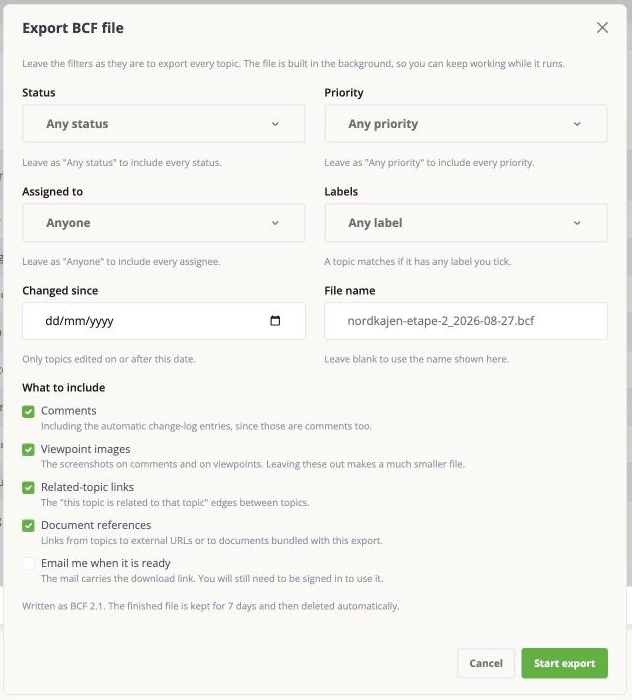
Leave everything alone and click Start export to get every issue in the project. The file is built in the background, so you can keep working while it runs.
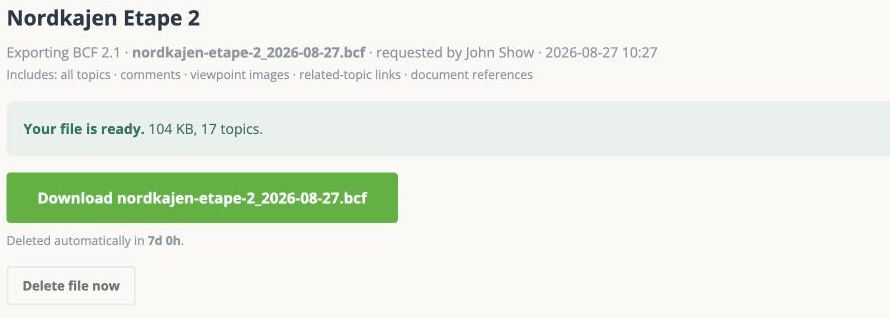
When it is done you land on the export's own page, with the download button on it.
Choosing what goes in
Four filters, each a dropdown you tick values in:
- Status - leave it on Any status to include every status.
- Priority - same, Any priority.
- Assigned to - Anyone unless you want one person's issues.
- Labels - an issue is included if it has any of the labels you tick, not all of them.
Plus Changed since, which takes a date and includes only issues edited on or after it. This is the one to use for a regular exchange: send the consultant what has moved since last time rather than the whole project again.
The filters in this dialog are the only thing that decides what goes in the file. Whatever you have filtered on your list or your board makes no difference. It is a common assumption and it is wrong.
File name and contents
File name - leave it blank to use the name shown in the dialog.
What to include, all ticked unless you untick them:
- Comments - the conversation, including the automatic change-log entries, because those are comments too.
- Viewpoint images - the screenshots on comments and viewpoints. Leaving these out makes a much smaller file, which matters if you are emailing it.
- Related-topic links - the links between issues.
- Document references - links to external documents, with the documents bundled into the file. This is the one to untick if the file is getting large.
And separately, Email me when it is ready - the mail carries the download link. You still have to be signed in to use it.
After it finishes
The status page offers download, and also retry and discard.
The finished file is kept for seven days and then deleted automatically. The record of the export stays as a history entry, but the file itself goes. If you need it again after that, run the export again.
Two limits worth knowing before you send it
The file is written as BCF 2.1, not 3.0. That is the version nearly every tool reads, so it is rarely a problem - but if somebody has asked you specifically for 3.0, this app cannot produce it.
The place cards sit in on your board is not part of BCF, so it is not in the file.
The full list is on What travels, and what does not.