Import a BCF file
Open the project, then Project > Import.
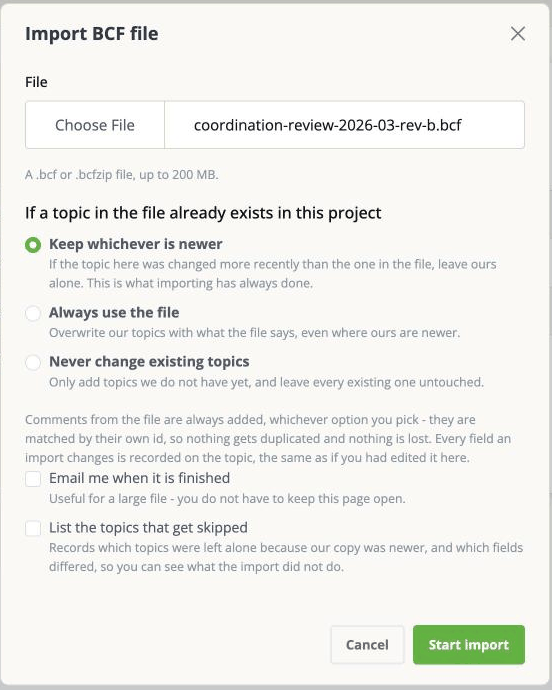
Choose the .bcf file and click Start import. The largest file the app accepts is
200 MB; anything bigger is refused before the upload starts.
A .bcf file is a zip archive, and the app also refuses one that holds an unreasonable
number of entries or expands to an unreasonable size. That guard is there to stop a
malicious archive, but a genuinely enormous export can trip it too - if it does, ask the
sender to split the file rather than trying again.
The upload shows a progress bar. Once it finishes, the import itself runs in the background - you can leave the page and carry on working.
What happens when an issue is already here
This is the part worth reading before you click.
An imported topic is matched to an existing issue by its identifier, not by its title. So re-importing an updated file from the same consultant recognises the issues you already have, rather than creating a second copy of each.
When a topic in the file matches an issue you already have, the app has to decide which one wins. You choose that up front:
Keep whichever is newer (the default) If the issue here was changed more recently than the one in the file, yours is left alone. Otherwise the file's version is used. This is what importing has always done, and it is the right answer nearly every time.
Always use the file The file wins everywhere, even where your copy is newer. Use this when the sender is the source of truth and you want to be sure you have exactly what they sent - and accept that edits made here since the last import are overwritten.
Never change existing topics Only genuinely new topics come in. Everything you already have is untouched. Use this when you want the new findings from a file without disturbing work in progress.
The two checkboxes
Email me when it is finished - useful for a large file, so you do not have to keep the page open.
List the topics that get skipped - records which topics were left alone because your copy was newer, and which fields differed. Worth ticking the first few times: it is the only way to see what the import decided not to do.
While it runs, and afterwards
The status page shows progress and offers retry, cancel and discard.
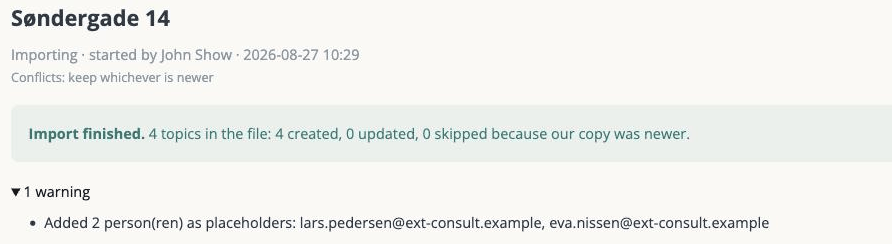
Two things change in the project as a side effect, and both surprise people:
People appear that you did not add. A BCF file names whoever raised each topic. Those people are added to the project as placeholder people so the attribution survives. They are not emailed, and they cannot open the project. If the file gives only an email address and no name, the address is what you will see.
Your dropdown lists may grow. If the file carries a status, type, milestone, priority or label your project has never used, that value is added to the project's options rather than rejected. Worth a look after the first import from a new source.
What you will not get
Emails about the changes. An import can rewrite hundreds of issues at once, and mailing every field change would bury the assignee. So imports deliberately send no change notifications. Nothing is hidden - the changes are all in the issue's history and in the project's activity feed - they are simply not pushed at anybody.
Sensible-looking dates on brand new imports. An imported issue can show two different creation dates and an author you do not recognise. Both are correct, and Imported issues: dates and authors explains why.