Imported issues: dates and authors
An issue that arrived in a BCF import carries dates and a name that did not come from anybody here. That is deliberate, and this page explains which date answers which question.
The short version
The issue's own dates and author are the file's. Not the import's. If a consultant raised something on 4 March in their own tool and you imported it in August, the issue says 4 March, and it says their name.
That is true on the issue itself and in the activity feed. So the age of an issue is its real age, and sorting by creation date sorts by when things were actually raised.
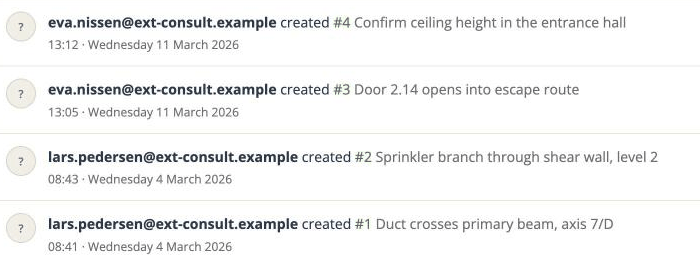
When it landed here is recorded separately, in two places: the import's own record page, and - if the import changed something - an automatic comment on the issue.
What an import writes on the issue
When an import updates a topic you already have, it leaves a Change log comment stamped with the moment of the import and the name of the person who ran it, listing every field it changed.
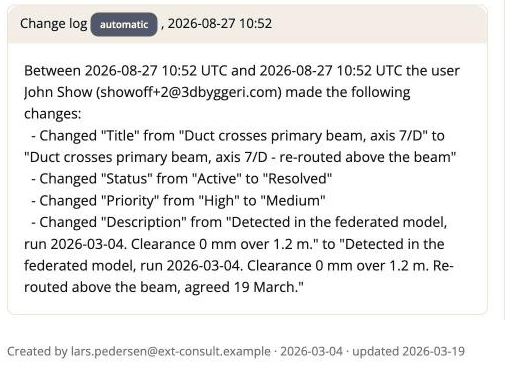
Read the two together and the whole story is there: raised 4 March by the consultant, last edited by them on 19 March, arrived here on 27 August when John ran the import.
A topic the import creates gets no change-log comment - there is no "before" to record. For those, the only record of when it arrived is the import's own page, reached from the Project menu, which says "started by John Show · 2026-08-27 10:52".
The unfamiliar name
The author on an imported issue usually will not be somebody you added. A BCF file names whoever raised each topic, and the import adds those people to the project as placeholder people so the attribution is not lost. The import page tells you when it has done this - "Added 2 person(ren) as placeholders: ...".
They have no account, they are never emailed, and they cannot open the project. If the file supplied only an email address and no name, the address is what you will see - which is why imported issues often show a bare address where you expect a name.
Which one to look at
| You want to know | Look at |
|---|---|
| How old the issue really is | The issue's own created date |
| Who originally raised it | The issue's own author |
| When it last changed at the sender's end | The issue's updated date |
| When it landed in this project | The change-log comment, or the import's record page |
| Who ran the import | The same two places |
Why it is not "tidied up"
The obvious simplification would be to stamp everything with the import, or to hide the import behind the file's dates. Either makes one of the two questions unanswerable, and the second one makes the audit trail lie about when a row was written here.
Keeping them apart costs one line of explanation - this page - and keeps both answers true.