Connecting an AI assistant
You can let an AI assistant work in the tracker for you: "what is assigned to me and overdue", "raise an issue about the beam clash on level 3", "summarise what changed on this one this week".
It works through MCP, a standard way of giving an assistant access to a tool. You do not have to know anything about it beyond what is on this page.
Connecting
In your assistant, add a connector with the address of your Issuetracker server followed
by /mcp. For the development server that is:
https://tasktracker-dev.glasshousebim.com/mcp
The assistant then does the rest by itself. You will see one login screen, where you sign in with your ordinary Issuetracker email and password, and that is the whole setup. There is no API key to generate, nothing to paste, and nothing to keep secret afterwards.
It signs in as you. It can see exactly the projects you can see and do exactly the things you are allowed to do - see Who may do what. It cannot reach anybody else's projects.
Once it is connected, you ask in ordinary words and the assistant works out which of the tools below to use. It says which connector it used, so you can see where the answer came from.
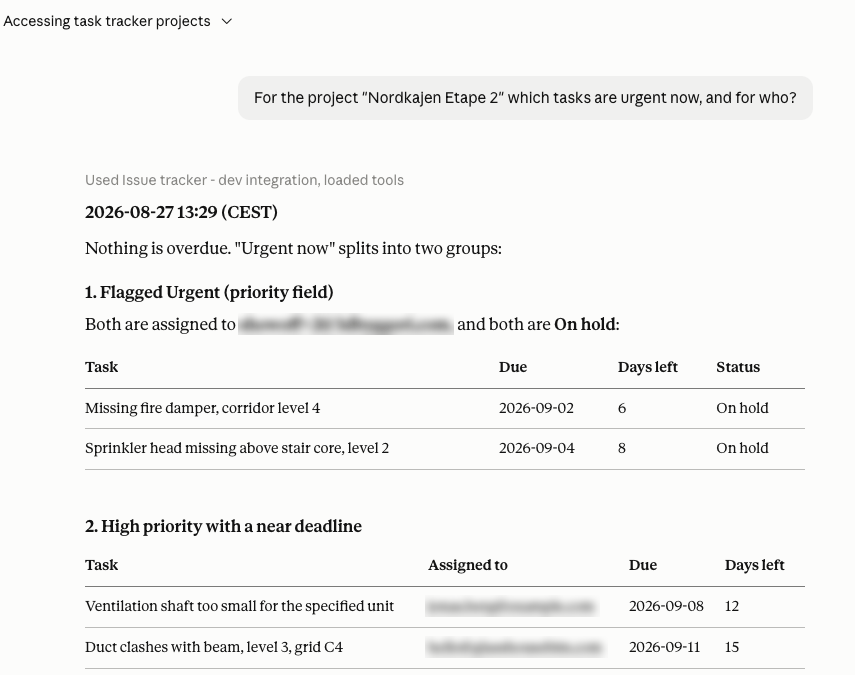
Assignee addresses blurred for this help page - on your own screen they are shown in full.
What it can do
Nine things. Six are read-only:
- who you are signed in as
- list your projects
- read a project's allowed values for Status, Type, Priority and so on
- read the issues in a project, with filtering, and in the order they sit on the board
- read an issue's comments, including the images attached to them
- read an issue's change history
Three make changes:
- raise a new issue
- change fields on an existing issue
- add a comment
What it deliberately cannot do
It cannot delete anything. No issue, no comment, no project. That is a deliberate omission rather than an oversight: deletion here is permanent and takes comments, attachments and history with it, and an assistant acting on a misread instruction would have no way to undo it.
If something needs deleting, a person does it in the app.
Its changes are real changes
An issue raised or edited by an assistant is indistinguishable from one you did yourself. It appears to everybody on the project, it is recorded in the issue's history under your name, and it can send notification emails.
So "tidy up the statuses on these forty issues" is forty real edits and possibly forty emails. A well-behaved assistant will tell you what it is about to change before doing a lot at once. It is worth asking it to, if it does not.
Creating and updating are recoverable - the history records the previous value of every field - which is the other half of why deletion is the one thing left out.
Values it will refuse
If you ask for a status the project does not have, the assistant will be told the value is invalid, given the list of real ones, and told to ask you rather than guess.
That is deliberate. An assistant that quietly substituted "the nearest thing" would fill your tracker with values you never chose. When it happens, either pick one of the listed values or add the one you want under Project options.
There is a budget
A connected assistant gets a limited number of requests per hour. Ordinary use is nowhere near it. A loop that has gone wrong hits it, is told to wait, and stops - which is the point of having one.
If an assistant tells you it has been rate limited, nothing is broken and nothing was lost; wait and carry on.
After the app is updated
Assistants remember the list of things a connector can do. If the tracker gains a new capability, an already-connected assistant will not notice until it re-reads that list.
Disconnect and reconnect the connector to refresh it. You stay signed in.
Before you rely on it
Read What an AI can and cannot see. There are three blind spots, and one of them - screenshots - catches people out constantly.