Comments and mentions
Comments are the conversation about an issue: what was tried, what was agreed, what is still blocking it. They sit under the description, newest first, so the latest word on an issue is the first thing you read.
(An exported BCF file and the API list them the other way round, oldest first, which is what the standard expects. Same comments, different order.)
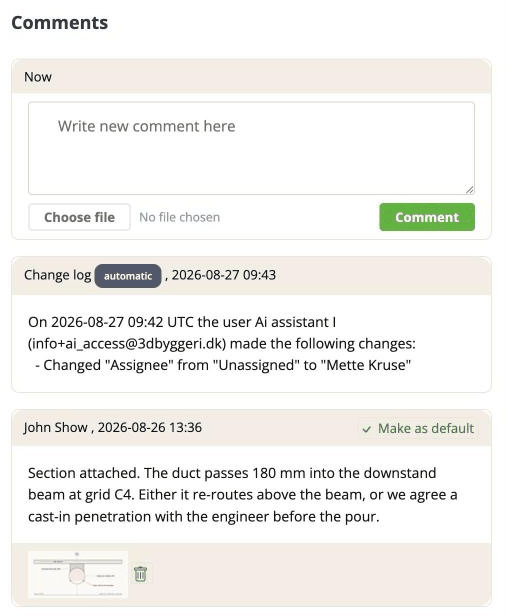
Writing one
Type into the box marked Write new comment here, then click Comment.
To attach a file to that particular comment, use Choose file next to the button before you post. This is the tidiest way to attach things: the file arrives with the words that explain it.
Who gets told
The assignee of the issue is emailed when a comment is added, provided they have notifications on for that project.
Nobody else is, unless you mention them.
Mentions
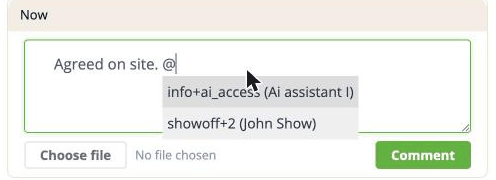
Type @ and a list of people appears. Pick one and their handle is inserted into your
comment.
Only people who have accepted an invitation can be mentioned. The list is narrower than the Assigned to dropdown, which also offers invitees who have not accepted and placeholder people. That is on purpose - a mention is an email, and those two kinds of person have no account to email. If somebody you expect is missing from the list, they have not accepted their invitation yet.
A mention emails that person whether or not they have notifications on for the project, and whether or not the issue is assigned to them. That is deliberate: a mention is a direct request for somebody's attention, not routine noise.
Your handle comes from your email address, so jane.smith@firm.dk is @jane.smith.
Addresses with a dot, a plus or a dash all work, and a mention at the very start of a
comment works too.
One rare exception: an address containing an apostrophe - o'brien@firm.dk - produces a
handle the app cannot match. If that is you, tell people to assign the issue to you rather
than mention you.
Editing and deleting
You can edit and delete your own comments. The project owner can edit and delete anybody's.
Comments that arrived through a BCF import often have no author recorded here, which means only the project owner can touch those.
Editing a comment is not currently recorded anywhere. The activity feed shows the original comment, not the edit, and an issue's history does not mention it either. So an edit is silent - worth knowing before you rewrite something somebody has already replied to.
The comments the app writes itself
Some entries are not written by a person. When a field changes, the app records it as an automatic note on the issue - "changed Status from Active to Resolved".
They are kept out of the activity feed, because the change is already listed there in its own right. They are included when you export a BCF file with Comments ticked, since they are stored as comments - which is worth knowing if you wonder why an exported file has more conversation in it than you remember having.
Comments and BCF
Comments travel. They go out in an export and come in on an import, so the conversation is not stranded in this app.
A comment written in somebody else's tool arrives here with their name against it - and if that person is not on your project, they are added as a placeholder person so the attribution survives.