When the app emails you
The app is deliberately quiet. It emails you about your own work, not about everything that moves.
The setting
Click your initials at the top right, then Profile. Below your name there is a Notifications section with one choice per project you are on:
- Notify me when my issues change
- No notifications
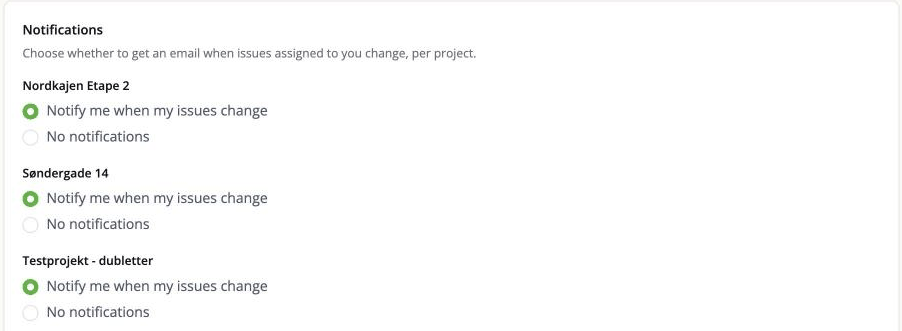
It is per project, so you can follow the one you are responsible for and stay out of the others.
What actually sends an email
Changes to an issue assigned to you. Somebody changes the status, the deadline, the description of an issue that is assigned to you, and you get a message describing what changed. Changes are gathered up and sent together rather than one mail per field.
Comments on an issue assigned to you.
A mention. If somebody writes @your name in a comment, you get it whether or not the
issue is assigned to you, and whether or not you have notifications on for that project.
A mention is a direct request for your attention, so it is not treated as routine noise.
An invitation to join a project.
Import or export finished, if you ticked that box when you started it. The export mail carries the download link.
Every message has the project name at the start of its subject, so a full inbox still sorts and filters sensibly.
What does not send an email
- Creating an issue. Even one assigned to you.
- Moving a card on the board, or changing its place in a column.
- Renaming or deleting a custom board column, even though that rewrites every issue in it. The changes are in each issue's history; they are just not mailed.
- A deadline arriving or passing. There are no reminders. If you need to be chased about a date, the app will not do it for you.
- Your own changes. If you are the only person who touched an issue assigned to you, you are not emailed about your own edits.
- A BCF import. An import can rewrite hundreds of issues at once, and mailing every change would bury you. The changes are all recorded in the issue history and the activity feed; they are just not pushed. See Import a BCF file.
Placeholder people never get anything
Somebody added with Add without invite is never contacted, whatever happens to the issues assigned to them. That is the whole point of them - see People on a project.
Not getting emails you expect
- Check the per-project setting on your Profile.
- Check that the issue is actually assigned to you. Raising an issue does not subscribe you to it.
- Check your spam folder.
- Check the address on your account is the one you read.
Getting too many
Turn the project off on your Profile. You will still get mentions, because those are somebody asking you directly.