Project options: the dropdown values Project owner only
Every project decides for itself what its issues can be. Status, Type, Priority, Milestone and Labels are lists you fill in, and they are what the dropdowns on an issue then offer.
You will find them under Project > Edit project, in the box called Default options.
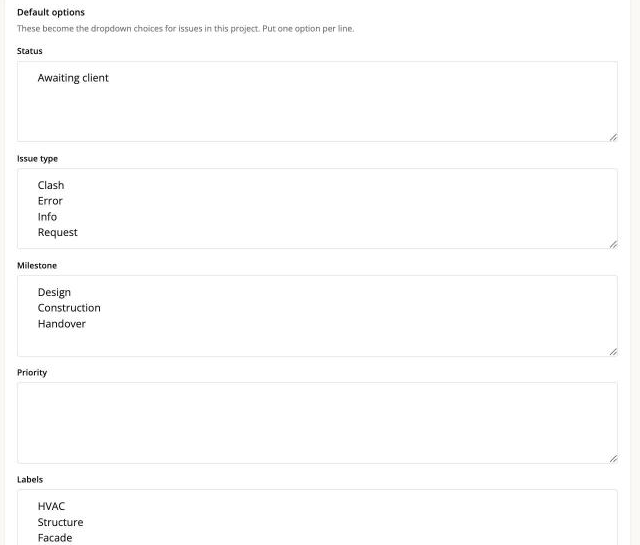
Type one value per line. Blank lines are ignored.
The one thing that surprises everybody
For Status and Priority, what you type is added to a built-in list. It does not replace it.
Every project always offers these, whether you ask for them or not:
- Status: On hold, Active, Resolved, Closed
- Priority: Low, Medium, High, Urgent, Modify
Anything you write in the Default options box is appended after those.
So if you type On hold into the Status box because you want it in your list, you now
have it twice - and on the board that means two separate columns with the same name,
each holding a different set of cards.

The rule is short: do not re-type the built-in values. Only add the ones you are missing.
If you have already done it, remove the duplicate line from Default options. The extra column goes away, and no issue changes its status - the value it holds is the same string either way.
The duplication is only in the web interface. The API and an AI assistant see the list once, so neither of them is confused by it - which is also why nobody notices until they look at a board.
The fields that start out empty
Type, Milestone and Labels have no built-in values. Whatever you put in the box is the whole list.
An empty list is not an error - it means the field has no fixed choices. For Labels that is often what you want. For Type and Milestone it usually means nobody has set them up yet, and the dropdown will look bare.
Reasonable starting points, if you want them:
- Type: what kind of thing this is - Clash, Error, Info, Request.
- Milestone: the phase or delivery it belongs to - the app calls this Milestone, the BCF standard calls it a stage.
- Labels: free-form tags. Several can be on one issue, and they are used by the filters and by export.
Changing a value later
Changing the list does not rewrite the issues that already use the old value. If you
rename Clash to Collision, issues that said Clash still say Clash, and they will
sit in their own column on the board until you change them one by one.
So it is worth spending five minutes on these lists early, rather than tidying them up across two hundred issues later.
The same lists apply outside the web app
These are also the values the BCF API and an AI assistant will accept. If an assistant tells you a status is invalid, it is reading this list - the fix is here, not in the assistant.
An import widens the lists automatically. When a BCF file arrives carrying a status, type, milestone, priority or label your project has never seen, that value is added to the list here rather than rejected. It is worth looking at this page after your first import, because the lists may have grown. See Import a BCF file.