Custom columns Project owner only
Besides grouping the board by Status, Assignee, Type, Milestone or Priority, there is a sixth option: Custom ordering - a board whose columns you define yourself, for a way of working the standard fields do not describe.
Choose it from Group by in the top bar. Only the project owner can add, rename, delete or reorder the columns; everybody else sees the board and can move cards on it.
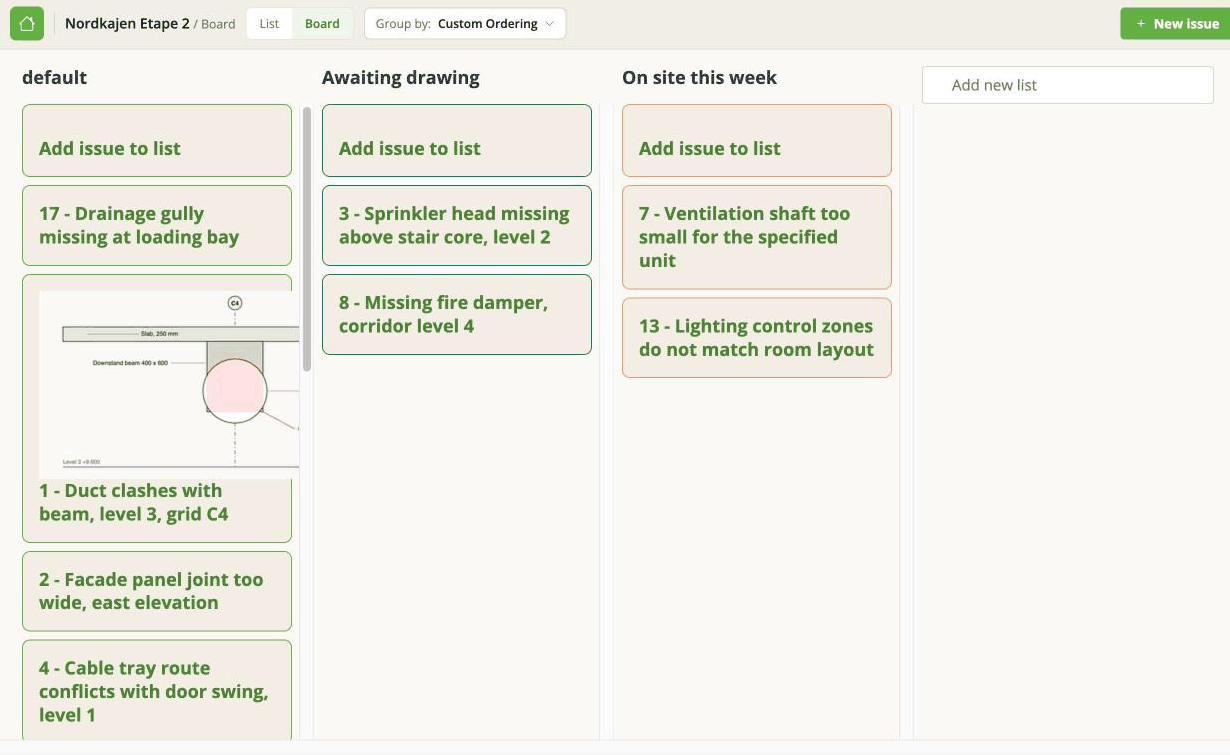
The board calls these columns lists - Add new list, Add issue to list - while the field on the issue is called Custom ordering. Same thing, two names.
Every project starts with one list called default, and every issue sits in it until you move it. It cannot be removed.
When it is the right tool
When the step an issue is at is not its status, its type or its phase. A review sequence, a set of trades, a physical sequence on site.
When it is not the right tool: anything the other side of an exchange needs to see. A custom column is stored on the issue as its Custom ordering field, which is this app's own field and not part of the BCF standard - so it does not go into an exported BCF file. If Status or Milestone would do the job, use those, because those are the ones other tools understand.
Managing the columns
Add, rename, delete and reorder are all on the board itself - Add new list sits to the right of the last one. They are not part of Project options; the Custom field box on the Edit project page is something else and does not feed this board.
"Add issue to list" makes a new issue. The link at the top of each list opens the new issue panel with Custom ordering already set to that list. It does not move an existing issue - for that, drag the card, or set Custom ordering in the issue panel.
Renaming or deleting a column changes the issues in it. The issues carry the column's name in their Custom ordering field, so the app rewrites them. That is recorded in each issue's history like any other change - but it deliberately sends no notification emails, because renaming one column could otherwise mail everybody about a hundred issues at once.
The rewrite happens while you wait. On a column holding several hundred issues, it can take long enough to time out. If that happens, reload and check the board before trying again - some of the issues may already have been moved.
Deleting a column does not delete the issues in it.
Custom ordering on an issue
The field is on the issue panel like any other, so you can set it there rather than dragging the card. The choices are the columns you have defined.
Not the same as the order of cards
Two different things that both sound like ordering:
- Custom columns decide which column a card sits in. Stored on the issue.
- A card's place within a column is set with the Place control in the issue panel - see Board view and grouping. That is a separate field.